1
/
of
2
Luminaria
DA-P DALI Push Dimmer | 100–240V Inline Push Controller
DA-P DALI Push Dimmer | 100–240V Inline Push Controller
Overview
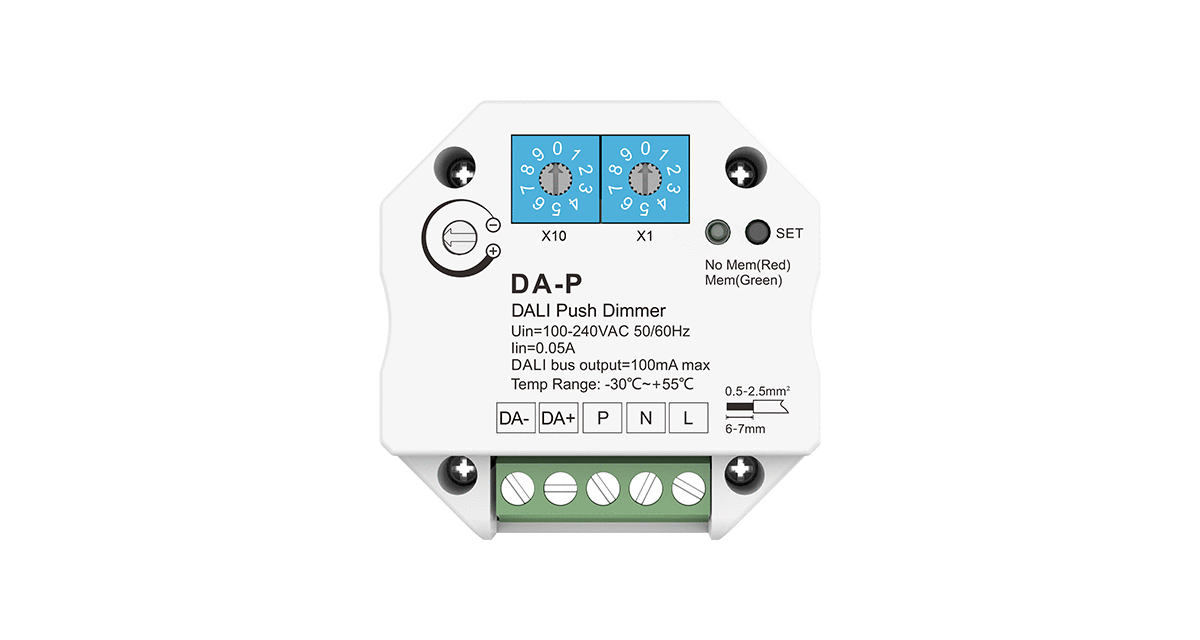
The DA-P DALI Push Dimmer is a compact single-channel controller designed to operate DALI drivers or ballasts using a conventional push-button switch. Powered directly from 100–240V AC, it converts simple push commands into DALI dimming signals, providing smooth brightness control, on/off switching, memory function and adjustable dimming speed. Its small inline housing makes it ideal for installation behind a wall switch or inside a junction box for residential and commercial lighting applications.
Key Features
- Compact DALI push dimmer for DALI drivers and ballasts
- Input voltage: 100–240V AC
- Control via standard momentary push-button switch
- Short press for on/off, long press for dimming up/down
- Adjustable dimming speed via rotary knob
- Memory function for last brightness level on power up
- Unidirectional, broadcast DALI communication to connected devices
- Designed for retrofit and new installations
- Ultra-compact housing for mounting behind switches or in small boxes
Technical Notes
- DA-P is intended for use with DALI-compliant LED drivers or ballasts only.
- Communication is unidirectional and broadcast, controlling all connected DALI devices on the line.
- Input and output share the same 100–240V AC supply; maximum output current is 0.05A.
- Dimming behaviour and minimum brightness depend on the connected DALI drivers.
- Memory function can be configured to restore last level or a defined level after power loss.
- Dimming speed is adjustable using the built-in rotary control on the device.
- Ensure all DALI drivers on the line are compatible with broadcast dimming control.
Wiring & Installation Notes
- Connect the DA-P to the 100–240V AC supply (L and N) according to the wiring diagram.
- Connect the output terminals to the DALI input of the driver or ballast as specified in the datasheet.
- Connect a momentary (non-latching) push-button between live and the push-input terminal.
- Short press on the push-button switches the connected lighting on or off.
- Long press dims the lighting up or down; repeated long presses alternate the dimming direction.
- Install the unit in a dry, ventilated location such as behind a wall switch or inside a junction box.
- Observe all local electrical regulations and ensure wiring is carried out by qualified personnel.
- Operating temperature range: approximately -30°C to +55°C; avoid enclosed spaces with excessive heat.
Applications
- Residential dimming of DALI LED drivers and ballasts
- Retrofit projects using existing wall push-buttons
- Commercial and office lighting with DALI drivers
- Corridor, lobby and circulation area lighting control
- Small DALI lighting groups requiring simple local push control
Technical Specifications
| Parameter | Specification |
|---|---|
| Model | DA-P DALI Push Dimmer |
| Application | Push dimmer for DALI drivers and ballasts |
| Input Voltage | 100–240V AC, 50/60 Hz |
| Output Voltage | 100–240V AC control to DALI devices |
| Max Output Current | 0.05 A (DALI control output) |
| Control Method | Momentary push-button (short/long press) |
| Communication Mode | Unidirectional, broadcast to connected DALI devices |
| Functions | On/Off switching, dimming up/down, adjustable dimming speed, memory function |
| Operating Temperature | Approx. -30°C to +55°C |
| Environment | Indoor, dry location |
| IP Rating | IP20 |
| Housing | Ultra-compact inline module for mounting behind wall switch or in junction box |
| Warranty | 5 years |
Share